
Many mobile phone bring mp3 players feature. But how if that mobile phone less memory to save many music? Don't worry we have a solution. It's simple, follow this tutorial:
First step
We use Audio Converter Studio to convert file. And we assumsed your PC was installed it.
Second step
Choose your file will convert. [File] -> [Folder]
Third step
Choose destination file. [Output Files] -> [Folder]
Fourth step
click song will convert with click blue arrow icon on Output Files
Fifth step
Choose song frequency in Output Format boxes (recommended 16000)
Sixth step
Choose bitrate song (recommended 32)
Seventh step
Choose mode, select stereo
Eight step
Do compres, please sit back and relax :)
We can convert song 4.7 MB to 1.3 MB hmmm, not bad
Read more..

Passion for Performance
The First USB Flash Drive that Looks as Fast as it Is
High-Speed Functional Art
One look at the SanDisk Extreme® Ducati Edition USB Flash Drive, and you know somethings different. The attractive industrial design echoes the performance, colors, and lines of a Ducati MotoGP motorcycle. And hidden beneath this unique exterior lies a fast, 20MB/second* USB Flash Drive, with plenty of horsepower for storing and transferring large files, such as images or video, quickly and efficiently. It moves 20 million bytes per second, while standing still and looking pretty.
The included RescuePro® Deluxe software delivers the added convenience of enabling users to recover images, documents, music, or other files that they may have accidentally deleted.
Gotta Get A Ducati?
For gadget gurus, design aficionados, and Ducatistis (Ducati loyalists), the SanDisk Extreme® Ducati Edition USB Flash Drive is an obvious choice. This limited edition Flash Drive is sure to turn a few heads with its bold color and design. Its equally at home on a Mac or Windows machine. Acquiring this gorgeous little device may be as close as you get to owning a Ducati cycle. But its far more than just a pretty case. The advanced technology in the guts of the SanDisk Extreme® Ducati Edition USB Flash Drive make it the perfect marriage of the SanDisk and Ducati brands, both of which are synonymous with speed, innovative design, and performance.
Read more..
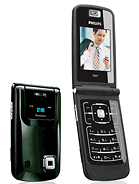
2G Network GSM 900 / 1800 / 1900
Size Dimensions 97 x 52 x 16 mm
Weight 82 g
Display Type TFT, 256K colors
Size 176 x 220 pixels
Second external OLED, monochrome display (64 x 64 pixels)
4-way navigation key
Ringtones Type Polyphonic (64 channels), MP3
Customization Download
Vibration Yes
Memory Phonebook Yes, Photocall
Card slot microSD (TransFlash), buy memory
- 64 MB user memory
Other
Data GPRS Class 10 (4+1/3+2 slots), 32 - 48 kbps
Bluetooth Yes, v2.0 with A2DP
Infrared port No
USB Yes, miniUSB
Features Messaging SMS, EMS, MMS, Email
Browser WAP 2.0/xHTML
Games 2 embedded
Colors Black
Camera 1.3 MP, 1280 x 1024 pixels, video(QCIF)
Other Feature
- Java MIDP 2.0
- MP3/AMR/AAC/MPEG4 player
- T9
- Calendar
- Calculator
- Currency converter
- Female calendar
- Built-in handsfree
Battery Standard battery, Li-Ion 1050 mAh
Stand-by Up to 740 h
Talk time Up to 8 h 30 min

Motorola's QWERTY keyboard equipped Q, formerly known as the RAZRberry in the rumor mills, might not exactly be the "BlackBerry killer" that many predicted, but it is certainly one of the most capable and user friendly smartphones available on the market today.
Based on Microsoft's Windows Mobile 5.0 Smartphone platform, the Q picks up the best features from Microsoft's Smartphone edition of Windows Mobile while still offering a lot of PDA-like capability and screen real estate on its 65k color, 320x240 pixel display.
In terms of hardware features, the Q's right side 3-way scroll wheel and dedicated back buttons take center stage. These give the Q user fast BlackBerry-like scrolling with the ability to select an item or return to the prior screen--all with the user's thumb. Of course you can still do these same things the traditional way by using the 5-way direction pad and the back button that sits to its right. There's also a dedicated home key as well as the red and green call control keys.
The Q's QWERTY keyboard is a bit stiff, but otherwise designed well. The dark keys serve double duty as the numeric keypad when the Option key (found left of the Z key) is used. The Option key can be locked on, as can the shift key on the opposite side of the keyboard. Along the bottom of the keyboard you'll find dedicated buttons for email, the 1.3-megapixel camera, and a dual-use key for the speaker-independent voice dialing system and speakerphone.
When it comes to hot features, though, the Q's EV-DO 3G data capability tops the list. When used in an EV-DO coverage area, the Q user can expect to get wireless data rates that approach those enjoyed by home DSL users. When there is no EV-DO coverage available, the Q will fall back to the slower 1xRTT data network (roughly comparable to a 56Kbps modem). The Q can also connect to a desktop PC with a USB or Bluetooth connection. Bluetooth can also be used with mono and stereo headsets, as well as other devices like keyboards.
While WiFi wireless access would have been a welcomed feature, it would have only led to even more strain on the already overtaxed battery. The standard capacity battery is capable of a respectable 5.5 hours of continuous talk time, but realistically will only provide a day of solid use, especially if the Q user takes advantage of the BlackBerry-like push email support. The push system can keep your Q lock step in sync with your corporate or home email inbox without any user intervention required. On top of email synchronization, it can also be used to synchronize the Q's contacts, calendar entries, tasks and other items with your home or office copy of Microsoft Outlook. It is somewhat eerie how you can enter a new contact or appointment on the Q and have it show up moments later in Outlook--or the other way around.
One of the great things about owning a smartphone is the ability to add 3rd party developed applications to the device. Since Windows Mobile 5.0 is quite popular, there are plenty such applications available both freely and for purchase. The Q has about 50MB of RAM for running applications, and a similar amount for storing data and the applications themselves. If you need more storage space, you can easily add a gigabyte or two by inserting a miniSD memory card into the Q's slot, located on the left edge of the device.
Read more..

* Windows Mobile 6 Standard
* Dimensions: 95mm x 59mm x 16.3mm
* Weight: 126g with battery
* RAM: 80Mb shared ROM/RAM memory
* Screen: 2.2" Colour TFT, 65k colours
* Resolution: QVGA, 320 x 240 pixel resolution
* Communications: 2100MHz 3G HSDPA, Triband 900/1800/1900 EDGE/GPRS/GSM
* Bluetooth v2.0 with A2DP support
* Camera: 2.0 megapixel (1600x1200) main, plus VGA video call camera
* Power Adapter: UK Mains Plug, included
* Battery: 1200mAh Lithium Ion
* Battery Standby: Up to 320hrs, manufacturer's figures
* Battery Talk Time: Up to 6hrs 30min, manufacturer's figures
* USB Interface: Mini USB
* Bundled applications: MS Office Viewer, PDF viewer, RSS reader
* MicroSD card slot
* QWERTY slide-down keyboard
* Five way navigation pad
There are two cameras on the SGH-i620, so this is a 3G phone like the i600. We also know that it supports tri-band GSM (900/1800/1900 MHz) and has a two megapixel camera with flash. There's a wide 320x240 pixel display too, which is a more practical arrangement for a smartphone than the typical "tall" display found on other phones.
Assuming that this is an updated slider version of the i600, we expect the Samsung i620 to support HSDPA (3.5G) data in addition to UMTS (3G). This should be a Windows Mobile 6.0 device with a wide range of supported multimedia formats, and this would mean that the SGH-i620 also comes with the usual array of Windows Mobile software. Stereo Bluetooth and microSD expandable memory are also to be expected. There are a lot of assumptions there - as yet there is no official word from Samsung as to the SGH-i620s exact technical specifications, and some of these could be wrong.
The design of the Samsung i620 is certainly appealing. If you're not using the QWERTY keyboard, then the simple controls allow access to most of the phone's functions without opening it up.. and if you want to type then the sliding keyboard is a no-compromise approach that may well give the best of both worlds.